How to Automatically Update Your iPhone Apps
There are times when your apps aren’t functioning properly, and sometimes it’s because you’re using an outdated version. You need to update your apps to get it to function smoothly, but what if you don’t like doing it manually? Continue reading to find out how you can set your iPhone apps to update automatically.
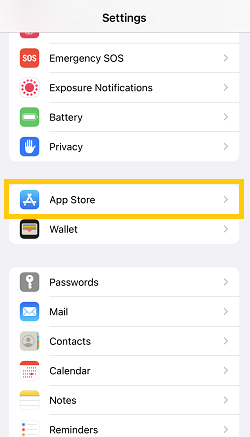
1. Open up your Settings app, and go to the App Store.

2. Lastly, toggle on App Updates under Automatic Downloads.


And that’s it. You just activated automatic updates on all your apps. Note that your iPhone may not always install the updates immediately. If that happens, you can go ahead and manually update your app.


