How to Leave a Note Attached to an Account (Android)
Badger Maps makes it easy for you to leave a note associated with a particular account. Once you are on the field, you can use the Badger Maps app on your Android device to take notes which you can refer to at a later time.
The process is fairly simple.
1. On the Badger Maps home page, go to the Accounts menu, and click the account you want to leave a note on.

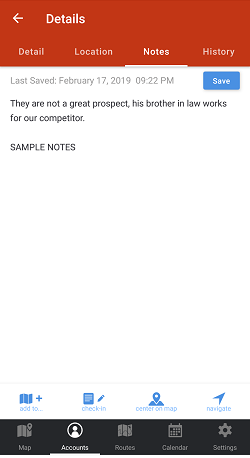
2. On the Details screen, go to the Notes tab.

3. Write a note on the white space, then click Save.

Here's how your screen will look like after saving your notes.
Check out this video to learn more on how you can manage your accounts.


